
Lockscreen Observer2.0.2 - Get APK
You'll be able to download in few seconds.
Publisher Description


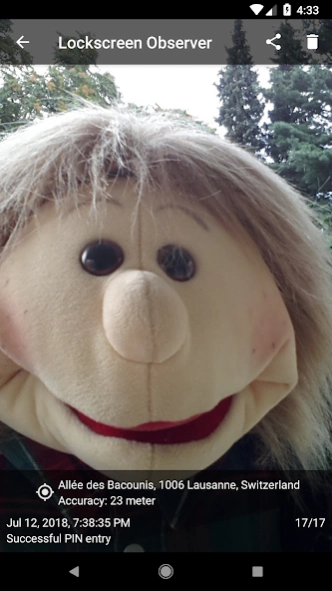
Let your front camera take a picture whenever a wrong PIN code is being entered
Are you concerned that someone might access your phone without your knowlegde? When you've just briefly left the room, while you're asleep or you lose your phone? Play it safe and find it out! Lockscreen Observer takes a picture with your front camera whenever a wrong PIN code is being entered. Receive the photo and the current location of your device via email.
Features
• The app takes pictures with your phone's front camera whenever a false access PIN code has just been entered
• Also determines the (GPS) location if a picture is taken
• Send photos and the location via email or simply store this data on your phone
• Set the number of failed access attempts after which a picture is being taken
• Display notification in the status bar whenever a new photo is available
• Our widget will inform you as soon as a new photo is available
• App reacts to false entry of either PIN code, pattern or even your phone's finger-print sensor!
• Since most of the photos will probably be of yourself (when you mistype the code), you hereby also get a nice selfie app
Take a picture when the correct PIN code is entered
It is also possible to have the app take a picture when the correct PIN code has been entered. This is only possible though, when a wrong PIN code has been entered at least once before the correct PIN code is being entered. So, should someone have found out the correct PIN code after various failed attempts, then you'll be notified and get a picture.
Unlock attempt not detected/no picture taken?
Android requires a minimal password/pattern length of 4 characters. Therefore, a picture is only being taken when a minimum of 4 characters have been entered (pin) or 4 pads have been connected (lock pattern).
Uninstall
In order to uninstall the app, you'll have to disable the 'Lockscreen Monitoring' in the app settings first. This is a restriction of the Android security policies.
This app uses the Device Administrator permission.
The Device Administrator makes use of the watch-login policy to get triggered when the wrong pin is beeing entered.
Contact
Send an email for any feature-requests, question or comment:
contact.bth.apps@gmail.com
Release notes and more:
https://plus.google.com/+bthApps
Join the beta community to gain access to early versions:
https://plus.google.com/communities/108025822567418467328
Homepage:
https://www.bthapps.com
Permissions
• CAMERA: Permission to access the camera, in order to take pictures with your phone’s front camera.
• ACCESS_FINE_LOCATION (GPS): Get the location of your device, when a photo is being taken.
• WRITE_EXTERNAL_STORAGE: Photos can be shared with other apps. For this to be possible, the photos have to be temporarily saved in the external storage.
• GET_ACCOUNTS: Photos can be sent via a local Gmail account. The selection of the desired Gmail account is made in the settings of the app, for which this permission is needed.
• USE_CREDENTIALS: Required in order to send mails and connect to the smtp-server (mailserver). The connection is established with an authentication token, instead of having to authenticate with username and password.
• INTERNET and ACCESS_NETWORK_STATE: Required to send mails and display a little ad. Google Analytics also uses this permission. We use Google Analytics in order to identify potential issues. You may disable the use of Google Analytics via the app settings.
About Lockscreen Observer
The company that develops Lockscreen Observer is bth apps. The latest version released by its developer is 2.0.2.
To install Lockscreen Observer on your Android device, just click the green Continue To App button above to start the installation process. The app is listed on our website since 2018-05-17 and was downloaded 0 times. We have already checked if the download link is safe, however for your own protection we recommend that you scan the downloaded app with your antivirus. Your antivirus may detect the Lockscreen Observer as malware as malware if the download link to com.bthapps.lockscreenobserver is broken.
How to install Lockscreen Observer on your Android device:
- Click on the Continue To App button on our website. This will redirect you to Google Play.
- Once the Lockscreen Observer is shown in the Google Play listing of your Android device, you can start its download and installation. Tap on the Install button located below the search bar and to the right of the app icon.
- A pop-up window with the permissions required by Lockscreen Observer will be shown. Click on Accept to continue the process.
- Lockscreen Observer will be downloaded onto your device, displaying a progress. Once the download completes, the installation will start and you'll get a notification after the installation is finished.
Program Details
System requirements
Download information
Pricing
Version History
version 2.0.2
posted on 2018-05-18
2.0.2
- added history in tab overview
- bugfixes
2.0.1
- bugfixes
2.0.0
- material design redesign
- bugfixes and improvements
1.3.8
- fixed appcrash on background processing on Oreo
1.3.7
- minor fixes/improvements
1.3.6
- added more detailed info about the required device manager policy
1.3.5
- fixed appcrash on Lollipop when creating a notification
version 1.3.6
posted on 2017-08-21
1.3.6
- added more detailed info about the required device manager policy
1.3.5
- fixed appcrash on Lollipop when creating a notification
1.3.4
- fixed a bug that causes an appcrash on some devices when a photo was taken
- fixed a bug that disabled the location setting after installation
1.3.3
- stabilized the processing of login events
- support aspect ratio 2.1
- minor fixes/improvements
version 1.3.0
posted on 2016-09-15
- new home screen widgets,- new setting: save pictures in public folder, so other apps may use them (automatically back up for example),- emails are sent more reliably after bugfix,- improved email layout,- frontcamera is not required anymore. get notified of new events without a photo,- a lot of refactoring and improvements because I moved from Eclipse ADT to Android Studio
Disclaimer
External Download
We do not host Lockscreen Observer on our servers. We did not scan it for viruses, adware, spyware or other type of malware. This app is hosted by Galad and passed their terms and conditions to be listed there. We recommend caution when installing it.
The APK Download link for Lockscreen Observer is provided to you by apps112.com without any warranties, representations or guarantees of any kind, so access it at your own risk.
If you have questions regarding this particular app contact the publisher directly. For questions about the functionalities of apps112.com contact us.
